
How the 2026 Silverado 1500’s camera tech makes tight towing easier around Pomona, CA
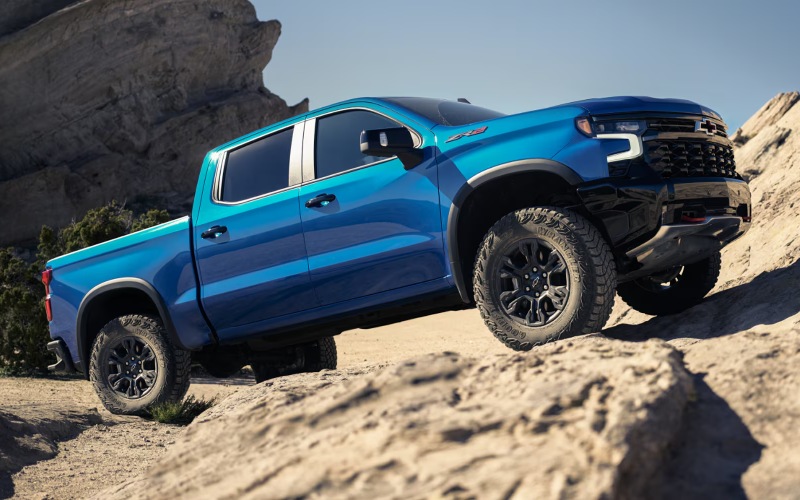
Orel Hershiser Chevrolet – How the 2026 Silverado 1500’s camera tech makes tight towing easier around Pomona, CA
Towing can feel complicated until you change what you can see. That’s the simplicity baked into the 2026 Chevrolet Silverado 1500’s camera technology—an available suite that delivers up to 14 views designed to make hitching, backing, lane changes, and low-speed maneuvers more intuitive. Around Pomona, where a day might take you from neighborhood streets to tight parking near the Arts Colony, those views can turn a nerve-wracking minute into a one-and-done move. If you’re sizing up a new half-ton for travel trailers, car haulers, or weekend toys, it’s worth understanding how the Silverado’s camera tech works together with its other trailering features.
What the camera views actually do for you
It’s easy to say “14 camera views”—it’s more useful to connect that number to the jobs you do. Silverado’s available camera system creates front, side, rear, and top-down perspectives, stitched in ways that help you see more than a single glance in a mirror can provide. The transparent trailer view can virtually let you see behind your trailer by combining feeds and calibrating to your trailer profile, while hitch view and guidance lines simplify that last few inches when you’re lining up the coupler. In Pomona’s tighter alleys and angled driveways, surround views help you account for poles, curbs, and steep transitions that can otherwise surprise a trailer tongue or your rear bumper.
Pair those views with Silverado’s available Trailer Side Blind Zone Alert, and the truck actively supports your awareness during lane changes. With a longer rig, it’s not just about the immediate blind spot—it’s about judging the space your trailer needs to clear. That’s where side-camera angles and mirror alerts complement each other so you can slide over on the 10 or 71 with more confidence, even when traffic compresses unexpectedly.
The Trailering App and why it matters locally
Chevrolet’s in-vehicle Trailering App is the quiet hero for repeatable towing. Create a trailer profile once—length, number of axles, tire pressure—and the truck recalls it whenever you connect. Before you pull out for a weekend at Bonelli Park or a race day near the Fairplex, you can run the step-by-step pre-departure checklist, test your lights from the app, and monitor trailer tire pressures if equipped. It’s the difference between “I think we’re set” and a systematic confirmation that saves time and reduces mid-drive stops. In a city like Pomona, where short on-ramps can demand decisive merges, those minutes matter.
Hands-free confidence on compatible roads
On compatible roads, the available Super Cruise® driver assistance technology can handle steering and speed—and Silverado goes a step further by supporting Super Cruise with trailering. If your weekends take you east past San Bernardino or out toward the desert, you can let the truck handle the routine highway work while you stay attentive. This isn’t about checking out—it’s about reducing the grind, so you arrive with more energy for setup, track time, or family plans. And because Silverado integrates the camera views so seamlessly, you can still toggle the perspective you need when it’s time to exit and navigate the last few turns to your site.
Torque, braking, and visibility—why the mix works
Camera tech is most effective when it’s paired with a truck that tows with composure. Silverado’s engine lineup checks that box. The standard TurboMax™ engine brings best-in-class standard torque at 430 lb-ft, delivering the low-end punch that helps with launches on grades or short freeway ramps. Step to the Duramax® 3.0L Turbo-Diesel for a confident 495 lb-ft and relaxed highway pulling—especially appealing if your trailer sees frequent trips up to Big Bear or eastbound climbs. The 10-speed transmissions across the V8 and diesel options keep you in the right gear, and an integrated trailer brake controller (when equipped) helps smooth your stops. Marry that torque, braking, and gear spread with the camera system’s visibility, and you’re set up to make towing smoother from your driveway to your destination.
Setting up your hitching routine
If you’re new to the Silverado’s camera system, a simple routine goes a long way. Start with Hitch View and the dynamic guidelines, then fine-tune with the close-up to center your ball under the coupler. Once latched, tap into the Rear Top-Down or Bed View to confirm your chains and wiring are routed cleanly. Before departure, open the Trailering App, run the checklist, and perform the light check—particularly helpful when you don’t have a spotter. After a couple of weekends, the process becomes muscle memory, and the cameras feel like second nature rather than tech you have to think about.
Backing into tight spaces around Pomona
Backing a trailer into a compact spot off Garey Avenue or down a narrow drive near Lincoln Park tests even seasoned drivers. Silverado’s available rear side views give you a parallel perspective of trailer wheels in relation to curbs or lines. Combine that with guidelines that respond to steering input, and you’ll find you can set your angle more precisely before you commit to the final arc. If your trailer profile is set up, the transparent trailer view can also be a helpful mid-maneuver check for obstacles behind the trailer. Translating this to time saved: fewer pull-up resets, less tire scrub, and less guesswork that tends to cause stress when traffic is waiting.
Who benefits most from these features
First-time trailer owners appreciate the confidence boost and structure of checklists and visual cues. Experienced towers love the time savings and the way camera coverage reduces avoidable dings and scuffs. If you rotate between different trailers—say, a utility trailer during the week and a camper on weekends—creating multiple profiles in the Trailering App streamlines your swaps. And for drivers who want extra assurance for family trips, the combination of stabilized pulling power, in-cabin visibility, and available monitoring for trailer tires is hard to beat.
Frequently Asked Questions:
Do I need special equipment to use all 14 camera views?
Silverado offers up to 14 views when your truck is equipped with the available camera packages and when a compatible trailer camera is installed for certain perspectives, like transparent trailer view. Your advisor can help you select the right package for how you tow.
Will the camera views help with fifth-wheel or gooseneck trailers?
Yes. Several views support bed-mounted hitches, including Bed View, to help align the ball and confirm safety chain routing. Additional side and rear perspectives assist with low-speed maneuvering in tight areas.
Does Super Cruise® work with a trailer on every road?
Super Cruise® is available on compatible roads and is designed to work even while towing. Always remain attentive and be ready to take control. Not all roads are compatible; your Silverado can display availability as you drive.
Is setup complicated for the Trailering App?
Setup is straightforward. Enter your trailer’s basic details once, and the app saves your profile. You can add multiple profiles if you tow different trailers.
If you want to try these features with your own trailer measurements in mind, our team can walk you through the views and app setup on a route that reflects real Pomona driving. It’s the clearest way to see how the 2026 Silverado 1500 turns complex towing into a simple, repeatable routine. Orel Hershiser Chevrolet is serving Montclair, Eastvale, and Pomona, and we’re ready to help you tailor the Silverado’s tech to your towing life.
0 comment(s) so far on How the 2026 Silverado 1500’s camera tech makes tight towing easier around Pomona, CA